Multiple Sequence Alignment
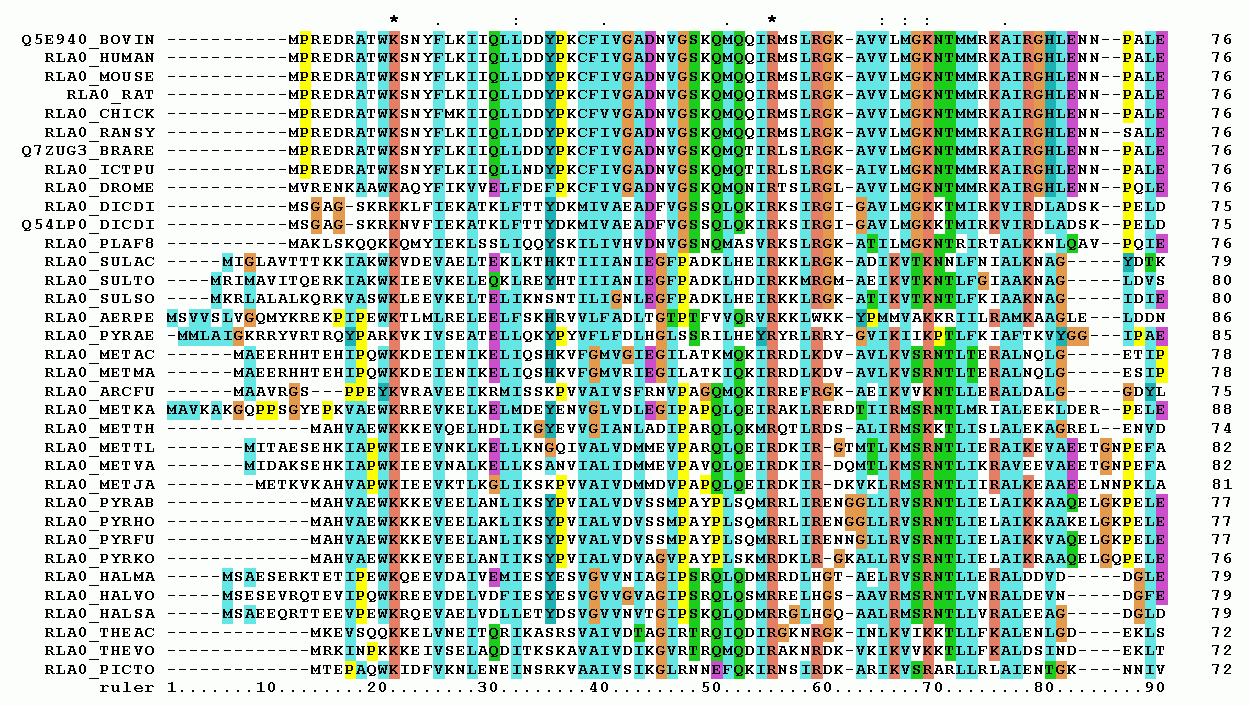
Multiple Sequence Alignment is the process of aligning three or more biological sequences (DNA, RNA, or protein) to identify regions of similarity that may be a consequence of functional, structural, or evolutionary relationships between the sequences. Unlike pairwise alignment, which compares only two sequences, MSA provides a more comprehensive view of the relationships among multiple sequences.
As a student entering the field of bioinformatics, understanding MSA is essential for your future work in areas such as evolutionary biology, protein structure prediction, and genomic analysis. MSA is critical in bioinformatics for several reasons:
- Evolutionary analysis: It helps in constructing phylogenetic trees and understanding the evolutionary relationships between species.
- Structural prediction: Aligned sequences can reveal conserved regions that are often important for protein structure and function.
- Functional annotation: By comparing unknown sequences with well-characterized ones, MSA aids in predicting the function of newly discovered genes or proteins.
- Primer design: In molecular biology, MSA is useful for designing primers for PCR experiments.
1. Methods to Construct MSA
1.1. Progressive Alignment Methods
Multiple sequence alignments (MSAs) are challenging to compute compared to pairwise alignments. Progressive methods are widely used due to their speed and reasonable accuracy. They work by:
- Performing pairwise alignments of all sequences
- Creating a guide tree based on the pairwise alignment scores
- Progressively aligning sequences or groups of sequences following the guide tree
Progressive alignment is suited for global alignment and may struggle with sequences of varying lengths.
Example: ClustalW algorithm
Step 1: Pairwise alignmentStep 2: Calculate distance matrixStep 3: Create guide tree (e.g., using UPGMA or Neighbor-Joining)Step 4: Progressive alignment following the guide tree1.2. Iterative Methods
Iterative methods aim to improve the alignment by repeating the process:
- Generate an initial alignment (often using a progressive method)
- Iteratively refine the alignment by adjusting the position of gaps and realigning sequences
Example:
- PRRN and PRRP are examples of iterative methods that use hill-climbing to maximize the MSA alignment score.
- MUSCLE is another iterative method that improves progressive methods by using a more accurate distance metric to assess sequence relationships.
Step 1: Generate a draft progressive alignmentStep 2: Improve the tree using Kimura distancesStep 3: Refine the alignment using tree-dependent restricted partitioning1.3. Consistency-based Methods
These methods aim to maximize the agreement between the MSA and pairwise alignments:
- Compute all pairwise alignments
- Extract alignment information into a library
- Combine pairwise alignments into a multiple alignment
Example: T-Coffee algorithm
1.4. Hidden Markov Model (HMM) Based Methods
HMMs provide a probabilistic framework for sequence alignment:
- Train an HMM on a set of sequences
- Use the trained HMM to align new sequences
Example: HMMER suite of programs
2. MSA filtering
MSA filtering addresses flaws in MSA approaches. MSA methods often rely on heuristic searches with flawed objective roles, leading to errors even in generally good outputs. Filtering aims to retain only the most reliable parts of MSAs. This is achieved by removing unreliable sites, sequences, or residues, replacing them with gap symbols or ambiguity symbols.
Filtering must balance noise removal and signal preservation. The goal is to remove errors without discarding important information. Two main types of MSA filtering techniques exist:
- TILI-filtering: Completely removes regions or sequences, offering a ""take it or leave it"" approach.
- Picky filtering: Hides unreliable elements by replacing them with gap or ambiguity symbols, retaining some information from the original region or sequence.

2.1. Filtering Techniques for Sequence Alignment
Gaps:
Gaps indicate areas difficult to align, possibly due to saturation. Too many gaps in a region can lead to alignment errors. Biologically, insertions and deletions are less frequent in proteins than point substitutions.
Excessive gaps might indicate alignment issues or unusual evolutionary patterns. Multiple mutations at the same location can obscure evolutionary signals.
Residue Similarity:
Homologous regions are expected to share similar amino acid properties. Sites with all the same amino acids suggest descent from a common ancestor. Sites with many substitutions could indicate saturation, where the evolutionary signal is lost.
Filtering out such sites can improve alignment accuracy. Hydrophobic or positively charged residues should generally be retained.
Sequence Similarity:
Homologous sequences are identified by their similarity. Regions with significant deviation from the rest of the alignment might be non-homologous.
This could be due to misalignment or lack of homology. Filtering should be done before alignment to avoid issues with long insertions.
Orthologous Sequences Consistency:
Non-orthologous sequences might escape basic filtering techniques. Phylogenomic settings allow for inspection of MSAs across multiple loci.
Tools like OrthoMaM and Phylo-MCOA can identify non-orthologous sequences. This technique is not applicable to studies focused on entire gene families.
3. Tools and Software: Choose wisely
MSA comes in two flavors: global and local alignments. Understanding their differences is crucial for selecting the right tool for your task. The single biggest mistake made with MSAs is assuming there is one tool that works equally well for all jobs. Many researchers default to Clustal, but this one-size-fits-all approach can lead to suboptimal results.
There are a variety of MSA tools, each with unique strengths:
- Clustal Omega: Fast and accurate for large datasets. Its process involves pairwise alignment, clustering, guide tree construction (UPGMA method), and final alignment using the HHalign package.
- Kalign: Fast, focuses on local regions, ideal for large alignments
- MAFFT: Employs Fast Fourier Transforms for medium-large alignments
- MUSCLE: Accurate, especially for proteins, suited for medium alignments. Fast and accurate, especially for large datasets.
- T-Coffee: Consistency-based, addresses progressive alignment issues, best for small alignments. Computationally intensive.
- PRALINE: Incorporates secondary structure information
- DIALIGN: Combines global and local pairwise alignments to create MSAs with statistically significant segments of equal length. It shares similarities with FASTA alignment.
- FAlign: Users need to identify and define motif regions in all sequences. Sequences split at motif boundaries, and segments are aligned progressively. Aligned segments are assembled to generate a final alignment.
Remember: The key to successful MSA is matching the tool to your specific alignment needs. Each tool has its strengths and weaknesses, and choosing the right one depends on your specific needs (e.g., dataset size, required accuracy, computational resources).
3.1. Clustal Omega
Clustal Omega is a new multiple sequence alignment program that uses seeded guide trees and HMM profile-profile techniques to generate alignments between three or more sequences. This tool can alignup to 4000 sequences or a maximum file size of 4 MB.
-
Visit https://www.ebi.ac.uk/Tools/msa/clustalo/ and load the unaligned nucleotide sequences that we were working with. Select Sequence type as “DNA”
-
Click on the Submit button.
-
Click on the “Guide Tree” button and take a snapshot of the Cladogram.
-
Click on the “Phylogenetic Tree” button and take a snapshot of the Cladogram.
- Q1: Compare and contrast between the two cladograms from Step 3 and 4.
-
From “Result Summary”, Click on the link below the “Percent Identity Matrix” section. Take a snapshot of the Percent Identity Matrix.
-
On the result page, click on “Download Alignment File” to download alignment file.
3.2. MUSCLE
MUSCLE (MUltiple Sequence Comparison by LogExpectation) seeks to maximize the sum-of-pairs (SP) score to construct MSA, using an iterative approach.
-
Visit https://www.ebi.ac.uk/Tools/msa/muscle/ and load the unaligned nucleotide sequences that we were working with.
-
Click on the Submit button.
-
On the result page, click on the “Phylogenetic Tree” button and take a snapshot of the Cladogram.
-
Click on “Download Alignment File” to download alignment file.
- Q2: Are there any obvious differences between the Clustal and MUSCLE MSAs?
3.3. T-Coffee
The main characteristic of T-Coffee is that it will combine results obtained with several alignment methods. This tool can align up to 500 sequences or a maximum file size of 1 MB.
-
Visit https://www.ebi.ac.uk/Tools/msa/tcoffee/ and load the unaligned nucleotide sequences that we were working with. Select Sequence type as “DNA”
-
Click on the Submit button.
-
On the result page, click on the “Guide Tree” button and take a snapshot of the Cladogram.
-
Click on the “Phylogenetic Tree” button and take a snapshot of the Cladogram.
- Q3: Compare and contrast between the two cladograms from Step 3 and 4.
-
From “Result Summary”, Click on the link below the “Percent Identity Matrix” section. Take a snapshot of the Percent Identity Matrix.
-
On the result page, click on “Download Alignment File” to download alignment file.
3.4. Kalign
A fast and accurate multiple sequence alignment algorithm. This tool can align up to 2000 sequences or a maximum file size of 2 MB.
-
Visit https://www.ebi.ac.uk/Tools/msa/kalign/ and load the unaligned nucleotide sequences that we were working with. Select Sequence type as “DNA”
-
Click on the Submit button.
-
On the result page, click on the “Phylogenetic Tree” button and take a snapshot of the Cladogram.
-
From “Result Summary”, Click on the link below the “Percent Identity Matrix” section. Take a snapshot of the Percent Identity Matrix.
-
On the result page, click on “Download Alignment File” to download alignment file.
3.5. MAFFT
Imagine a tool so versatile it can handle almost any Multiple Sequence Alignment (MSA) challenge you throw at it. Enter MAFFT - the Multiple Alignment using Fast Fourier Transform. It’s not just powerful; it’s a shape-shifter, adapting its algorithms to tackle your unique dataset with precision and speed.
MAFFT’s Superpower: Algorithmic Agility MAFFT doesn’t just align sequences; it strategizes. It offers three distinct approaches:
- The Sprinter: Progressive alignment (think Clustal, but faster)
- The Perfectionist: Iterative refinement with quality checks
- The Gap Master: Advanced iterative refinement, excelling at handling those pesky insertions and deletions
The Speed vs. Accuracy Dance There’s a trade-off, of course. Speed decreases from 1 to 3, while accuracy increases. But here’s where MAFFT shines - it lets you choose your priority.
Extreme Alignment Capabilities
- Ultra-long sequences? No sweat. MAFFT aligns sequences up to 1,000,000 base pairs.
- Massive datasets? Bring it on. It can handle over 50,000 sequences.
- And it does all this faster than its competitors. How’s that for efficiency?
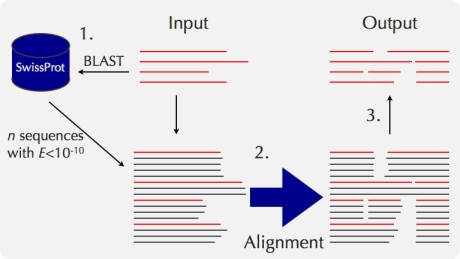
The Secret Weapon: MAFFT-homologs Picture this: MAFFT doesn’t just align your sequences. It scouts for homologs, bringing in reinforcements to boost alignment accuracy. Here’s how it works:
- Recruit: MAFFT gathers 50 close homologs of your input sequences.
- Align: It then aligns everything - your sequences and the homologs - using its sophisticated L-INS-i strategy.
- Refine: Finally, it removes the homologs, leaving you with a superbly aligned result.
-
Visit https://www.ebi.ac.uk/Tools/msa/mafft/ and load the unaligned nucleotide sequences that we were working with.
-
Click on the Submit button.
-
On the result page, click on the “Guide Tree” button and take a snapshot of the Cladogram.
-
Click on the “Phylogenetic Tree” button and take a snapshot of the Cladogram.
- Q4: Compare and contrast between the two cladograms from Step 3 and 4.
-
From “Result Summary”, Click on the link below the “Percent Identity Matrix” section. Take a snapshot of the Percent Identity Matrix.
-
On the result page, click on “Download Alignment File” to download alignment file.
- Q5: Is there any difference between Guide Tree and Phylogenetic Tree? If yes, why?
4. Applications and Use Cases
4.1. Phylogenetic Analysis
MSA is crucial for constructing phylogenetic trees:
- Align homologous sequences from different species
- Identify conserved and variable regions
- Use alignment to infer evolutionary relationships
Example: Studying the evolution of the SARS-CoV-2 virus by aligning spike protein sequences from different strains.
4.2. Protein Structure Prediction
MSA aids in predicting 3D structures of proteins:
- Align target sequence with homologous sequences
- Identify conserved regions likely to be structurally important
- Use this information to guide structure prediction algorithms
Example: Using MSA to improve the accuracy of AlphaFold2 in protein structure prediction.
4.3. Functional Annotation
MSA helps in predicting the function of unknown proteins:
- Align unknown sequence with well-characterized sequences
- Identify conserved motifs or domains
- Infer potential function based on similarities
Example: Identifying potential enzyme active sites in a newly sequenced bacterial genome.
4.4. Primer Design
MSA is valuable for designing PCR primers:
- Align multiple sequences of the target gene from related species
- Identify conserved regions suitable for primer binding
- Design primers that will work across multiple species or strains
Example: Designing universal primers for amplifying a specific gene across multiple bacterial species.
4.5. Identification of Regulatory Elements
MSA can reveal conserved non-coding sequences that may have regulatory functions:
- Align genomic sequences from multiple species
- Identify conserved non-coding regions
- Predict potential regulatory elements (e.g., transcription factor binding sites)
Example: Discovering enhancer elements by aligning non-coding regions upstream of orthologous genes in mammals.
7. Conclusion
Multiple Sequence Alignment is a cornerstone technique in bioinformatics, with applications spanning from evolutionary biology to personalized medicine. As a student entering this field, mastering MSA will provide you with a powerful tool for analyzing and interpreting biological sequences. The field continues to evolve, driven by the challenges of big data, the integration of diverse biological information, and the application of cutting-edge machine learning techniques.
As you progress in your studies, we encourage you to:
- Gain hands-on experience with various MSA tools and algorithms
- Understand the theoretical foundations behind different alignment methods
- Stay updated on the latest developments in the field
- Consider contributing to ongoing research in MSA, particularly in addressing current challenges
By developing expertise in Multiple Sequence Alignment, you’ll be well-equipped to tackle complex problems in bioinformatics and contribute to advancing our understanding of biological systems at the molecular level.
8. Scholarly References
- Sievers, F., Wilm, A., Dineen, D., Gibson, T. J., Karplus, K., Li, W., Lopez, R., McWilliam, H., Remmert, M., Söding, J., Thompson, J. D., & Higgins, D. G. (2011). Fast, scalable generation of high-quality protein multiple sequence alignments using Clustal Omega. Molecular Systems Biology, 7(1), 539.
- Edgar, R. C. (2004). MUSCLE: multiple sequence alignment with high accuracy and high throughput. Nucleic Acids Research, 32(5), 1792–1797.
- Katoh, K., & Standley, D. M. (2013). MAFFT multiple sequence alignment software version 7: improvements in performance and usability. Molecular Biology and Evolution, 30(4), 772–780.
- Thompson, J. D., Higgins, D. G., & Gibson, T. J. (1994). CLUSTAL W: improving the sensitivity of progressive multiple sequence alignment through sequence weighting, position-specific gap penalties and weight matrix choice. Nucleic Acids Research, 22(22), 4673–4680.
- Notredame, C., Higgins, D. G., & Heringa, J. (2000). T-Coffee: A novel method for fast and accurate multiple sequence alignment. Journal of Molecular Biology, 302(1), 205–217.